Explainer
What Is an AI Movie Maker? The 4 Types, Explained (2026)

An AI movie maker is an app that turns written ideas into moving video instead of filmed footage. There are four main types: text-to-video clip generators, script-to-film studios, avatar presenter tools, and interactive story apps. They differ in what you control, what you get out, and how much editing you still have to do yourself.
"AI movie maker" is one of those phrases that covers wildly different products. Search it and you will find tools for ad agencies, tools for corporate training videos, and tools for people who just want to see a story in their head come to life. They all generate video. They do not do the same job.
This guide sorts the field into four categories, explains what each one is good and bad at, and gives you a short checklist for picking the right one. We make FICT, an interactive AI movie maker app, so we will also say plainly where it fits and where it does not.
What does an AI movie maker actually do?
Every AI film maker does the same basic thing underneath: it takes an input you can type (a prompt, a script, a premise) and produces frames that move. What changes from product to product is everything around that step.
- The input. A single sentence, a full screenplay, a script for a presenter to read, or a story idea you build on over time.
- The unit of output. One clip, an edited sequence, a talking-head video, or a string of connected scenes.
- Who holds the story together. In some tools, you do, in an editor. In others, the software tracks characters, setting and plot for you.
Most video generation today still happens in short bursts of a few seconds. That is the single most useful fact to understand: nearly every "AI movie" is really a sequence of short generated shots. The question is whether you stitch them together or the app does.
The four types of AI movie maker
1. Text-to-video clip generators
You write a prompt, you get a clip. These are the tools behind most of the viral AI video you have seen: a cinematic drone shot, a surreal creature, a product spinning in the light. They give you the most visual control per shot, and many let you upload a reference image or pick a camera move.
The catch is that each clip is its own island. Keeping a character's face, costume and world consistent across twenty clips is your job, and so is editing them into something with a beginning, middle and end. Great for filmmakers, editors and creators who already know how to cut footage. Hard going if you just want a story.
2. Script-to-film studios
These tools start from a script or a scene list. You write or paste a screenplay, the software breaks it into shots, generates them, and lays them out on a timeline you can adjust. Some add voiceover, music and subtitles.
This is closer to "make a movie with AI" in the traditional sense. You get a linear film with a planned structure. The tradeoff is time: you are expected to write the whole thing up front and then fix shots one by one, usually on a desktop. They suit people making trailers, pitches, explainers or longer narrative pieces.
3. Avatar and presenter tools
Here the output is a realistic person, or a stylized character, speaking your script to camera. These are built for training videos, sales outreach, product walkthroughs and translated announcements. They are excellent at lip sync and multilingual delivery.
They are not really for fiction. You control what the presenter says, not a world or a plot. If you searched "ai movie maker" hoping to tell a story, this category is probably not what you want, though it often ranks for the term.
4. Interactive story-driven apps
The newest category treats the movie as something you steer while it is being made. You set up a premise, the app generates the first scene, and then you decide what happens next. The app keeps track of the characters and the plot so each new scene continues from the last.
FICT is in this category. You are not editing a timeline; you are directing a story one choice at a time. The output is a single film that replays start to finish. You give up fine-grained shot control in exchange for never touching an editor, and for the fun of not knowing exactly where your story will go.
AI movie makers compared: what you control and what you get
| Type | What you control | What you get | Best for | Where it falls short |
|---|---|---|---|---|
| Text-to-video clip generator | Each shot: subject, camera, style, reference images | Individual clips of a few seconds | Filmmakers, editors, ad and social creators | Continuity and story are entirely on you |
| Script-to-film studio | The whole script, shot list and timeline | A linear, edited film | Trailers, pitches, explainers, planned narratives | Front-loaded writing, slow iteration, usually desktop |
| Avatar / presenter tool | The words, voice, language and presenter | A person or character talking to camera | Training, marketing, localization | Not built for fiction or worlds |
| Interactive story app (e.g. FICT) | The premise, style, and every plot turn | One continuous animated film, built scene by scene | People who want to tell a story, fast, on a phone | Less per-shot control; you shape the story, not the camera |
None of these is "the best AI movie maker." They answer different questions. If your question is "how do I get this exact shot," pick a clip generator. If it is "what happens if my heroine gets on that train," an interactive app is the more natural fit.
What to look for in an AI movie maker app
Once you know which type you need, these are the details that separate a good experience from a frustrating one.
- Continuity. Does the same character look like the same character from scene to scene? This is the hardest problem in AI film, and the one that most affects whether your result feels like a movie.
- Where it runs. Browser tools are fine at a desk. If you want to make something on the bus, look for a real phone app.
- How pricing works. Almost every AI video tool uses credits. Check what one scene or one clip costs, whether failed generations are refunded, and whether a free allowance lets you try it first.
- Privacy. Is there a public feed? Do you need an account? Where do your videos live? These matter more than people think, especially for personal or silly stories.
- Style range. Anime, watercolor, 3D, painterly, cinematic. Make sure the look you want is one the tool handles well.
- Waiting time. Generation takes time everywhere, and it varies with demand. A good app gives you something to do while you wait.
Where FICT fits
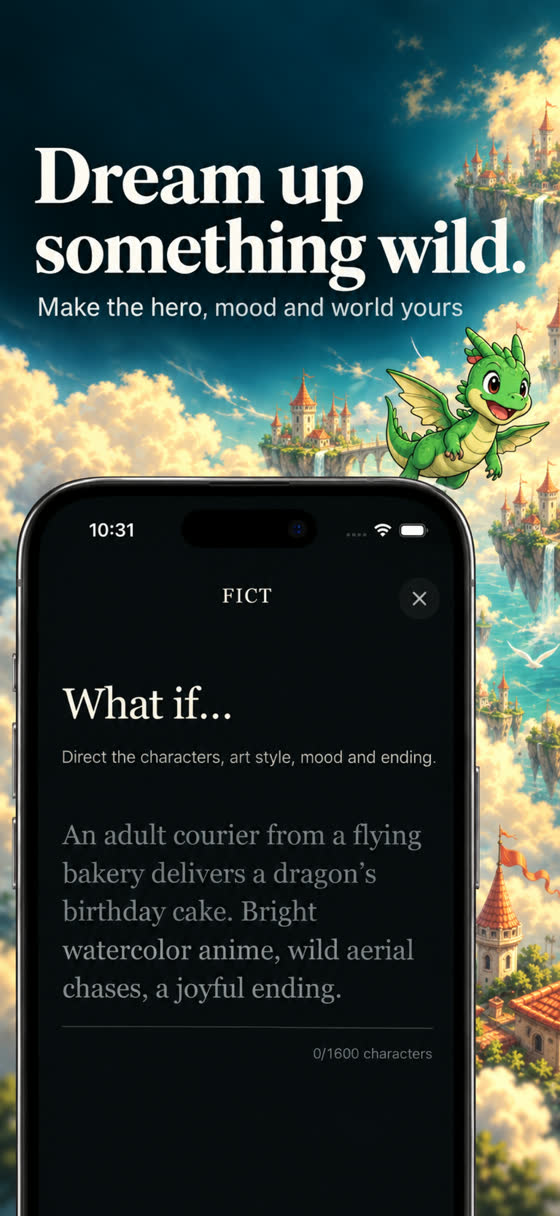
FICT is an interactive AI movie maker for iOS and Android. It is built around a simple loop:
- Write a premise, or pick a story from the in-app shelf. Describe your protagonist, world, mood and visual style: anime, watercolor, 3D and so on.
- FICT generates an animated scene with narration or dialogue text. Scenes are 5 or 10 seconds long.
- After each scene, choose one of three suggested actions or write your own. Your choice becomes the next scene.
- Keep going as long as you like. Films have no fixed length. Completed choices are permanent, and the finished film replays from start to finish.
A few practical details. There is no login and no public feed; your stories are private, films live on your device, and you can delete your stories and data in Settings. A 5-second scene costs 10 credits and a 10-second scene costs 20. New players get 20 free credits, and if a generation fails, the credits are refunded once, automatically. There is also a free sample film, The Last Train, you can watch before spending anything.
Subscriptions are optional. At the time of writing, FICT Director Weekly is US $8.99 and adds 200 credits each week you open the app, and FICT Director Yearly is US $59.99 and adds 60 credits each week you open the app. The app shows your local price. There is no free trial and no unlimited generation.
FICT is not the right tool if you need a specific camera move for a commercial, a presenter reading a script, or a two-hour feature. It is the right tool if you want to see a story idea turn into an animated film in a few minutes and decide what happens next yourself.
How to make a movie with AI in practice
Whatever tool you choose, the same habits help:
- Start small. Aim for a one-minute story before a ten-minute one. Short films teach you how the tool thinks.
- Be specific about the look. "Rainy neon city, anime, warm lamplight" beats "cool city." The same prompt habits apply to still images; see AI story generators with pictures for a hero-world-mood-style template.
- Give your hero a want. A character who wants something gives every scene a direction.
- Plan for the ending. Even an open-ended film needs a moment that feels like a payoff.
For a full walkthrough, see How to Make an AI Short Film on Your Phone. If the branching side interests you, read Choose Your Own Adventure AI, Explained or the longer history of interactive movies. For a wider look at story apps, see the best interactive story apps.

Write a “what if…”, watch the scene, choose what happens next. New players get 20 free credits.
Writing about AI film tools? Facts, screenshots and founder details are on our press page.
Frequently asked questions
What is an AI movie maker?
An AI movie maker is software that generates moving pictures from a description instead of footage you film yourself. Depending on the type, you give it a text prompt, a script, a presenter script, or a story premise, and it produces video clips, a finished edit, a talking presenter, or an animated story you steer scene by scene.
Can I make a whole movie with AI?
You can make a short film or an episodic story, but most tools generate a few seconds at a time. Clip generators leave the stitching and continuity to you. Story-driven apps like FICT chain short scenes into one continuous film automatically, and the film can keep going as long as you keep adding scenes.
Is there an AI movie maker app for phones?
Yes. Many tools are browser-based, but some are built for phones. FICT is an iOS and Android app where you type a premise, watch a 5 or 10 second animated scene, and choose what happens next, all on your phone with no account required.
Are AI movie makers free?
Most use credits or subscriptions because video generation is expensive to run. Many offer a small free allowance. FICT gives new players 20 free credits, enough for two 5-second scenes or one 10-second scene, and includes a free sample film you can watch without spending anything.
What is the difference between an AI video generator and an AI movie maker?
People use the terms loosely. A video generator usually means a tool that turns one prompt into one clip. An AI movie maker implies some sense of story: multiple scenes, recurring characters, and an order that makes sense from start to finish.