Guide
AI Anime Video Generator: Clips, Restyles or a Whole Story?
An AI anime video generator turns a prompt, an image or footage into anime-style video. Most are clip generators that make a few seconds from a prompt or restyle tools that convert real video into anime. Character tools keep one hero consistent, and story tools chain scenes with narration and choices. Choose by whether you want a clip, a filter or an episode.
Search for an AI anime video generator and the first page is almost all tool landing pages, each promising anime from a single prompt. They're not all doing the same job. One makes a pretty five-second shot. Another repaints your phone video in cel shading. A third tries to give you something closer to an episode, with characters who talk and a plot that moves.
This guide sorts them by what you actually walk away with, then gives you a prompt formula for anime shots that works in any of them.
What does an AI anime video generator make?
| Type | Input | What you get | Good for | Watch out for |
|---|---|---|---|---|
| Clip generator | Text prompt or a still image | A short anime-style shot, usually 5–10 seconds | Edits, social posts, mood reels, music videos | No plot; you stitch clips together yourself |
| Video-to-anime restyle | Footage you filmed | The same motion, repainted in an anime look | Turning real dance, travel or skits into anime | Needs good source footage; faces can flicker |
| Character and storyboard tools | Character description or reference art | Consistent character images, boards and clips | Webtoon-style series, planning a longer piece | More setup before you see motion |
| Story scene maker | A premise and your choices | Linked anime scenes with narration or dialogue that play as one film | Watching a story unfold, choose your own adventure play | Less shot-by-shot camera control |
AI anime video generators, by type
Here's where some of the tools that rank for this search fit. Descriptions come from each tool's own page as of September 30, 2026. Features and prices change often, so use this as a map, not a review.
Clips from a prompt or image
- Higgsfield AI Anime Video Generator says it can create, style, animate and voice anime from a prompt, a photo or footage.
- Vidu AI Anime Video Generator focuses on anime video with consistent characters and stylized motion.
- Adobe Firefly AI Animation Generator covers 2D and 3D animation from ideas and characters, useful if you already work in Adobe tools.
Real footage turned into anime
- DomoAI describes turning existing footage into anime or other styles based on a reference.
Characters and storyboards
- Elser AI positions itself as an anime generator and OC (original character) maker for consistent characters, art, storyboards and videos.
Anime scenes that tell a story
- FICT is an AI movie maker for iPhone and Android. You pick anime (or watercolor, 3D and other styles), and each part of the story becomes a 5 or 10 second animated scene with narration or dialogue. After each scene you choose what happens next. More on that below.
How to choose an AI anime video generator
- Clip, filter or story? If you'll cut the result into an edit, a clip generator is enough. If you already filmed something, a restyle tool keeps your motion. If you want characters, dialogue and a plot, look for a tool that links scenes.
- Test character consistency first. Make three short shots of the same character before you commit. If the hair, face or outfit keeps changing, a longer piece won't hold together.
- Check voice and sound. Silent clips need music or voice added later. Some tools include narration or dialogue in the scene itself.
- Read the credit math. Video burns credits fast. Work out how many seconds of anime your free credits or plan actually buys.
- Check the rules on characters. Expect limits on famous characters and real people. Designing your own original character avoids that and makes the result yours.
How to write an anime video prompt
Anime prompts fail the same way most AI video prompts fail: they describe a vibe, not a shot. Write it like a storyboard panel.
| Part | What to write | Example |
|---|---|---|
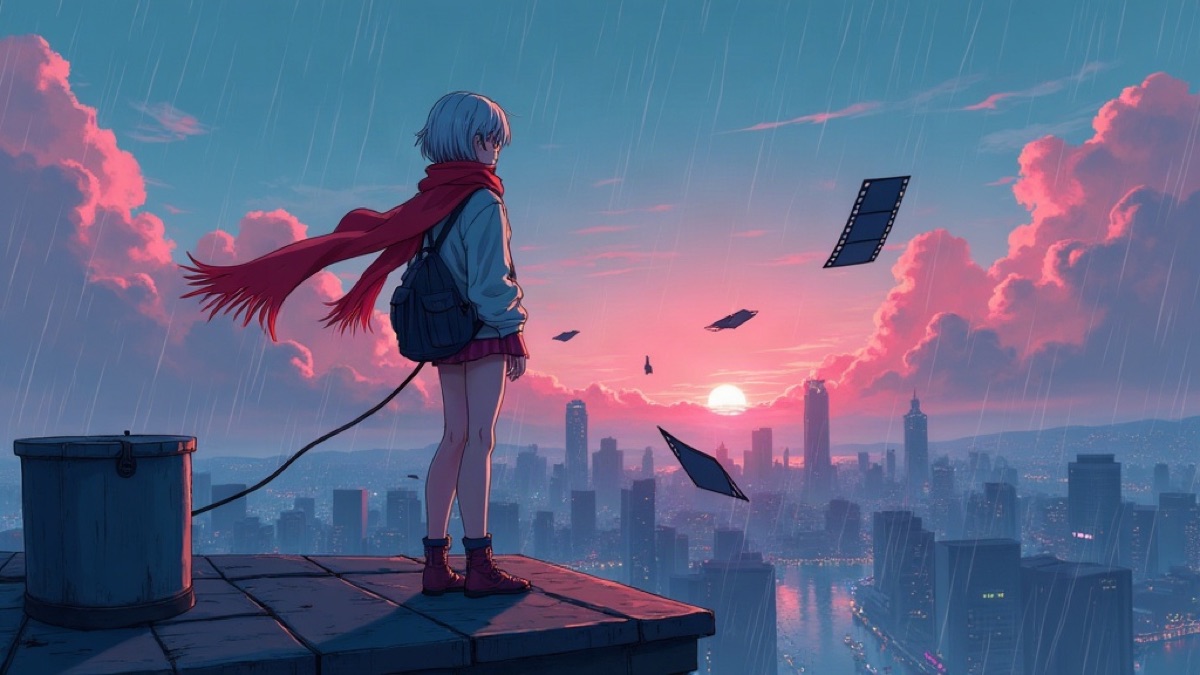
| Character sheet | Three or four fixed details you repeat every time | A courier with short silver hair, a long red scarf and a canvas backpack |
| Place and time | One line, with weather or light | A rooftop above a rainy city at sunset |
| Action | One clear movement per shot | She turns as a film strip blows past her face |
| Camera | Shot size and movement | Wide shot, slow push in |
| Style | The anime look, kept identical across shots | Hand-drawn anime, cel shading, pink and teal sky |
| Sound (if supported) | A line of dialogue or narration | "If I'm late, the whole city forgets tomorrow." |
One action per shot matters most. "She runs, jumps, fights and cries" in a five-second clip gives you a blur. Split it into four shots.
Need a premise before you prompt? Start from a "What if…" question. Our 100 what if scenarios and 60 story ideas with hooks and twists are full of anime-ready setups. The same hero-world-mood-style habit works for stills too; see AI story generators with pictures.
How to make an anime story with AI in FICT
A clip generator gives you shots. If you want to see where a story goes, with characters who speak and a plot you steer, FICT works a different way:
- Set up your "What if…". Describe your protagonist, the world and the mood, and pick anime as the art style. You can also start from a story in the in-app library.
- Choose 5 or 10 seconds. FICT makes the first animated scene with narration or dialogue.
- Pick what happens next. Choose one of three options or type your own. Choices can't be undone, so the story keeps moving forward.
- Keep going. There's no length limit, and the finished film plays back from the start as one piece.
New players get 20 credits. A 5-second scene costs 10 credits, a 10-second scene costs 20, and a failed scene is refunded once. There's also a free sample film, The Last Train, to watch before you make anything. FICT doesn't need a login and has no public feed, and it only supports original characters. For the branching side, read choose your own adventure AI, explained.

Write a “what if…”, watch the scene, choose what happens next. New players get 20 free credits.
Common problems with AI anime video and how to fix them
- The character changes between clips. Paste the same character sheet into every prompt and don't change the style words.
- Motion looks mushy. Ask for one simple movement and a steady camera. Fast action and big camera moves in the same shot are the hardest case.
- It looks more 3D than anime. Name the look directly: hand-drawn, cel shading, flat colors, clean line art.
- The clips don't add up to anything. Write the story beats first: want, obstacle, turn, ending. Then make one shot per beat, or use a tool that builds scenes from the story for you.
Frequently asked questions
What is an AI anime video generator?
It is a tool that makes anime-style video from a text prompt, a still image or existing footage. Most produce short clips of a few seconds. Some restyle a video you already have, and a few chain scenes together so they tell a story with narration or dialogue.
Is there a free AI anime video generator?
Several tools offer free credits or a free tier, but video costs more to make than images, so free use is usually capped. FICT gives new players 20 credits, enough for one 10-second or two 5-second anime scenes, plus a free sample film to watch first. Check each tool's own page for current limits.
How long are AI anime videos?
Most generators make clips of roughly 5 to 10 seconds at a time. Longer videos come from joining clips, either by hand in an editor or inside a tool that links scenes. In FICT each scene is 5 or 10 seconds and a film has no length limit.
How do I keep my anime character consistent across clips?
Write a short character sheet with three or four fixed details, such as hair color and cut, one clothing item and one prop, and repeat it in every prompt. Keep the same art style words each time, and avoid changing lighting and camera style too much between shots.
Can I make anime of existing characters with AI?
Many tools block or restrict famous characters and real people, and using them can raise copyright and likeness problems. Original characters are the safer choice, and FICT only supports original characters.