Guide
AI Filmmaking for Beginners: Workflow, Tools and Costs (2026)
AI filmmaking means generating a film's shots with AI, then writing, ordering and editing them yourself. For a beginner the workflow is: write a short script, list the shots, make reference images of your characters, generate 5 to 15 second clips (Runway, Kling AI or Google Flow), cut them in a free editor, then add voice and music.
Most "AI filmmaking" pages are either a course pitch or a list of 30 tools. If you are starting out, you need something smaller: what the job actually involves, which tool does which step, and what it will cost you before you have made anything good.
This guide covers that. Prices and limits come from each company's own pricing page or store listing, checked on 2026-11-16 unless a row says otherwise. Disclosure: we make FICT, an AI movie app, and say below where it fits and where it does not.
What is AI filmmaking?
AI filmmaking is making a film where AI generates some or all of what you see and hear: the shots, the characters, sometimes the voices and music. The parts that make it a film are still yours. You decide the story, which shots exist, what order they go in and where each one cuts.
The main reason it works differently from ordinary filmmaking is clip length. AI video tools make short clips. Kling AI's App Store listing states up to 15 seconds per clip, with an extension feature up to 3 minutes. Google Flow makes 4 to 10 second clips. So a 2-minute film is usually 10 to 25 separate generations, picked from many more attempts, and edited together.
There are four common ways to do it, and they suit different people:
| Approach | How it works | Good for | Example tools |
|---|---|---|---|
| Shot by shot | You write a prompt (or give an image) for each shot and generate it | The most control; closest to directing | Runway, Kling AI, Google Flow |
| Script to video | You paste a script or topic and get an edited draft back | Explainers, ads, fast first drafts | InVideo AI |
| Storyboard first | You plan scenes and characters in a project, then generate | Longer stories with recurring characters | LTX Studio |
| Watch and steer | A finished AI movie stops at choices and you pick the path | Trying AI movies without making one | FICT |
The AI filmmaking workflow, step by step
This is the shot-by-shot workflow, because it teaches you the most and works with almost any tool.
- Write a one-page script. Aim for 30 to 60 seconds of screen time: one character, one place, one change. Short films made with AI fall apart when they try to cover too much.
- Turn it into a shot list. Write one line per shot: who is in it, what happens, and the camera (close-up, wide, slow push in). Ten shots is plenty for a first film.
- Make reference images. Generate or draw one clear image of each character and the main location. Most tools can start a clip from an image, which keeps faces and places closer from shot to shot than text alone.
- Generate each shot, several times. Expect to throw most attempts away. Keep the prompt for each shot in your shot list so you can redo one later.
- Edit. Put the clips in order in an editor, trim the start and end of each (AI clips often drift in the last second), and cut on movement.
- Add sound. Voice, music and effects do more for an AI film than another round of generations. Silent AI clips look like demos; the same clips with sound look like a film.
For a phone-only version of this with a template, see our guide to making an AI short film on your phone.
What are the best AI filmmaking tools for beginners?
Pick by the step you are on, not by a ranking. These are the tools we would point a beginner to, with facts from each company's own page.
| Step | Tool and platforms | Free option | Lowest paid plan (US) | Why a beginner might pick it |
|---|---|---|---|---|
| Generate shots | Runway Web, iPhone, Android | 125 one-time credits (they don't expire) | Standard, $15 a month or $12 a month billed yearly: 625 credits, which Runway says is 52 seconds of Gen-4.5 | Many models in one workspace, and the pricing page says how many seconds your credits buy |
| Generate shots on a phone | Kling AI iPhone, web | Free download, in-app purchases | Credits or a plan in the app | Up to 15 seconds per clip in 1080p, extension to 3 minutes (App Store listing) |
| Generate and arrange clips | Google Flow / Gemini app Web; Gemini app on phones | Free plan has no video generation listed | Google AI Plus, $4.99 a month: video in the Gemini app and 200 Flow credits | The cheapest monthly plan we could confirm; Flow lets you order clips into a sequence |
| Script to edited draft | InVideo AI Web, iPhone, Android | No free plan on the pricing page | Starter, $10 per seat a month billed yearly (400 credits) | Paste a script, get a cut you can then fix |
| Plan the whole story | LTX Studio Web | 800 one-time credits, personal use only | Lite, $12 a month billed yearly; storyboards and consistent Elements start at Standard, $28 a month billed yearly (checked 2026-11-02) | Built around storyboards and reusable characters |
| Edit | DaVinci Resolve Mac, Windows, Linux | Free version | Studio, $236 one-time (sale price shown on 2026-11-16, was $295) | A professional editor that is free to learn on |
| Edit on a phone | CapCut iPhone, Android, desktop | Free download (US App Store) | In-app purchases | The quickest way to cut clips together on a phone |
Prices change often and differ by country, so treat each app's checkout screen as final. Sora is not on this list: OpenAI shut the Sora app down in April 2026. Our comparison of AI movie generators covers Luma, Adobe Firefly and the differences between the generation models in more depth.
How much does AI filmmaking cost?
Less than a camera, more than the free tiers suggest. Two things push the cost up:
- You throw most clips away. If you keep one take in three, a 60-second film made of 6-second clips needs about 30 generations, not 10.
- Credits don't compare between apps. Runway's Standard plan is 625 credits, InVideo's Starter is 400, Google AI Plus is 200 Flow credits. A credit buys a different amount of video in each app and for each model. Runway is unusual in stating it: 625 credits is 52 seconds of Gen-4.5 or 104 seconds of Gen-4 Turbo.
A practical budget for a first short: one month of the cheapest plan that fits your step (US $5 to $15 on the plans above) plus a free editor. Make the film on that before you pay for anything bigger. The real cost comparison is to make the same 5-second shot in two tools and see how many credits each one uses.
What AI filmmaking still can't do well
Honest limits, so they don't surprise you halfway through:
- The same character in every shot. Faces and clothes drift between generations. NVIDIA researchers described multi-shot character consistency as an open problem in 2024. Reference images help; they don't solve it. Plan shots that don't depend on a perfect face match.
- Long continuous action. Clips are short, and extended clips can wander. Cut more often instead.
- Exact dialogue on screen. Lip movement that matches a specific line is still hit and miss. Voice-over and off-screen dialogue are easier.
- Owning all of it. In the US, the Copyright Office said in January 2025 that AI output is protected only where a human author has determined sufficient expressive elements, and that prompts alone don't count. Your script, your edit and your arrangement of the shots can be protected. This is general information, not legal advice, and each tool's terms also govern commercial use.
Do you need an AI filmmaking course?
Not to start. The hard parts are story, shot planning and editing, and those are the same skills as in any filmmaking. Make one 30-second short on a free tier or a single month of a cheap plan first. A course is worth more once you know which tool you will stay with and where you keep getting stuck, and you can judge whether its examples look like what you want to make.
Where FICT fits
FICT is not a filmmaking tool, and if you want to make your own film from your own script, the tools above are the right place to start. FICT is for the other half of the interest in AI movies: watching one and deciding where it goes.
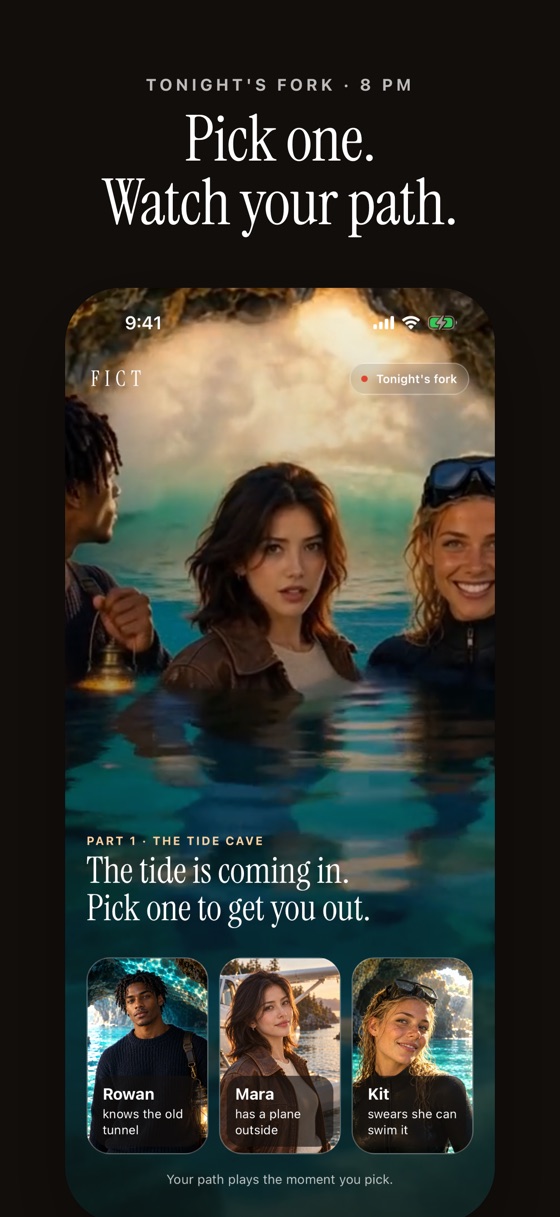
FICT: AI Movie Maker, from SecondEarth AI, Inc., works like this. Every night at 8 PM (you can change the time), a new AI movie stops at a fork. You pick one of three people and their path plays right away: about four 10-second scenes with one more choice in the middle, ending in a movie poster with your name on it. The first path each night is free. FICT Director (US $8.99 a week or US $59.99 a year, no free trial) unlocks every path and lets you write your own twist, which becomes new AI scenes at 20 credits per 10-second scene.
The trade-off is real: you can't bring your own characters or script. If you want to try branching stories in other forms, our list of AI interactive video apps compares six, and what an AI movie maker is explains the categories.

Every night at 8, a new AI movie stops at a fork. Pick one of three and your path plays right away. Your first path every night is free.
Sources
- Runway. Pricing. checked 2026-11-16
- Google. Google AI plans. checked 2026-11-16
- InVideo. Pricing. checked 2026-11-16
- Kling AI. Kling AI: AI Image & Video Maker (App Store). checked 2026-11-16, version 3.10.21
- LTX Studio. Pricing. checked 2026-11-02; the page did not load in our 2026-11-16 check
- Blackmagic Design. DaVinci Resolve. checked 2026-11-16
- U.S. Copyright Office (2025). Copyright and Artificial Intelligence, Part 2: Copyrightability. published 2025-01-29
- U.S. Copyright Office (2025). Copyright Office Releases Part 2 of Artificial Intelligence Report (NewsNet 1060). checked 2026-11-16
- The Decoder (2026). OpenAI sets two-stage Sora shutdown with app closing April 2026 and API following in September. reports the dates from OpenAI's help page
- Atzmon, Gal, Tewel, Kasten and Chechik (NVIDIA Research) (2024). Video Storyboarding: Multi-Shot Character Consistency for Text-to-Video Generation. arXiv:2412.07750
Frequently asked questions
What is AI filmmaking?
AI filmmaking is making a film where AI generates some or all of the shots, and often the voices or music too. A person still writes the story, picks and orders the shots, and edits the result. Most AI video tools make clips of about 4 to 15 seconds, so a film is many clips cut together.
Can I do AI filmmaking for free?
You can start for free, but not finish much. Runway gives 125 one-time credits, Kling AI is a free download with paid credits, and DaVinci Resolve and CapCut are free editors. Regular generation needs a paid plan; the cheapest we confirmed on 2026-11-16 was Google AI Plus at US $4.99 a month with 200 Flow credits.
What is the best AI filmmaking app for beginners?
If you want to make your own film on a phone, Kling AI (clips up to 15 seconds, extension to 3 minutes) or the Gemini app on a Google AI plan are the simplest starts. If you have a script, InVideo AI turns it into an edited draft. If you only want to watch and steer an AI movie without making one, FICT needs no prompts.
Do I own the copyright to an AI film?
In the US, only partly. The U.S. Copyright Office said in January 2025 that AI output is protected only where a human author determined enough of its expressive elements, and that prompts alone are not enough. Your script, your edit and your creative arrangement of the shots can be protected. Check each tool's terms for commercial use.
Do I need an AI filmmaking course?
Not to start. The basics are story, shot planning and editing, which are the same as in any film. Make one 30-second short with a free tier first. A course is worth more once you know which tool you will use and where you get stuck.