Guide
How to Make an AI Short Film on Your Phone: 5 Steps (2026)

To make an AI short film on your phone, write a one-paragraph premise with a hero, a world, a mood and an art style, generate the opening scene, then direct each following scene by choosing what happens next. Keep the hero's goal clear, raise the stakes each scene, and end on a reveal.
You do not need a camera, a crew or an editing suite to make a short film anymore. You need an idea and your phone. What you still need, and what AI cannot supply for you, is a story that is worth watching.
This guide covers both halves: the mechanics of making an AI generated film on your phone with FICT, and the craft choices that make the difference between a pile of pretty clips and a short film someone would watch twice.
What you need before you start
- The FICT app on iOS or Android. No account or login is needed.
- A premise. One short paragraph. There is a template below.
- Credits. A 5-second scene costs 10 credits, a 10-second scene costs 20. New players get 20 free credits.
If you want to see what the result looks like first, watch the free sample film, The Last Train, inside the app. It costs nothing and shows how choices turn into scenes.
How to make an AI short film, step by step
Step 1: Write your "What if..." premise
Open FICT and tap the "What if..." box. This is where the film begins. Describe four things: who your protagonist is, what world they live in, the mood, and the visual style. You can also skip writing and start from a story on the in-app shelf, then make it your own.
A premise like "a girl finds a dragon" will work, but it gives the app very little to hold on to. A better one: "A night-shift courier for a floating bakery has to deliver a birthday cake to a grumpy dragon before sunrise. Bright watercolor anime, fast aerial chases, warm and funny." Now there is a job, a deadline, a place and a tone.
Step 2: Choose the look
Style belongs in the premise. Name it plainly: anime, watercolor, 3D, painterly, noir. Add two or three concrete visual cues, like "rain-slick platform, amber lamplight" or "pastel skies, floating islands." Specific nouns beat adjectives. "Cinematic" alone says almost nothing; "low sun over a harbor, long shadows" says a lot.
Step 3: Generate the opening scene
Pick a scene length. Five seconds (10 credits) is good for quick beats and reactions. Ten seconds (20 credits) gives a moment room to breathe, which suits an opening or a big reveal. FICT generates an animated scene with narration or dialogue text you can read while watching, or hide if you prefer pure picture.
Generation time varies with demand. While you wait, you can rewatch earlier scenes. If a generation fails, your credits are refunded once, automatically.
Step 4: Direct the next scene
After every scene, FICT offers three suggested actions. Pick one, or write your own. Whatever you choose becomes the next scene. This is the core of the whole process, and it is where you act as director: you are not choosing shots, you are choosing what the story does.
Choices are permanent once a scene is made, so think for a second before you tap. That constraint is a feature. It keeps you moving forward the way a real film has to.
Step 5: Decide when it is finished, then replay
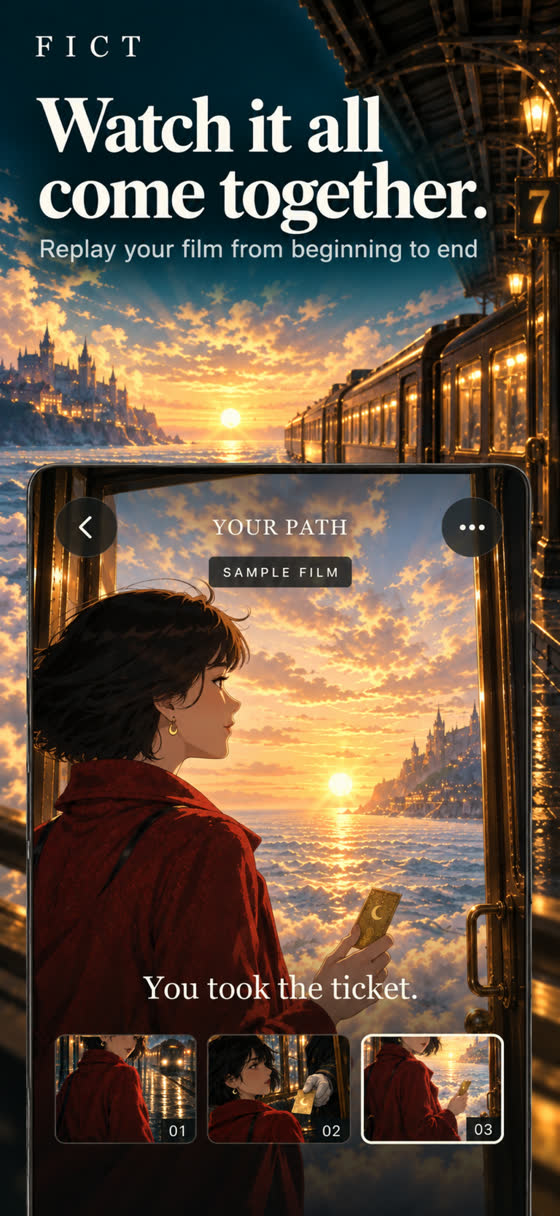
FICT films have no fixed length. You can stop at four scenes or keep going for forty. When you reach a moment that feels like an ending, stop there and replay the film from start to finish. Watching the whole thing in one go is the best way to judge whether it works, and often shows you which choice was the turning point.
A premise template for AI short films
Fill in the blanks. You do not need every line, but the first three matter most.
| Element | Prompt yourself with | Example |
|---|---|---|
| Hero | Who are they, in one detail? | A retired stage magician who still wears his cape to the grocery store |
| Want | What do they need, right now? | To find the rabbit that vanished during his last show, thirty years ago |
| World | Where and when? | A seaside town where the pier lights never switch off |
| Obstacle | What is in the way? | The town's new mayor has banned magic |
| Mood | How should it feel? | Wistful, gently funny |
| Style | What should it look like? | Soft watercolor, dusk colors, drifting fog |
Stitched together: "What if a retired stage magician set out to find the rabbit that vanished during his last show thirty years ago, in a seaside town where magic is now banned? Wistful and gently funny, soft watercolor, dusk colors, drifting fog."
Craft tips: how to make an AI short film people actually watch
Hook them in the first scene
Your opening scene has five or ten seconds to make someone care. Start in the middle of something: a door opening, a ticket being offered, a cake sliding off a rooftop. Avoid openings that only establish a location. A place is not a hook; a person in trouble in a place is.
Give the hero one clear want
AI scenes can drift. The best anchor is a single goal the audience can hold in their head. "Catch the last train." "Win the cooking contest." "Find out who sent the letter." When you pick or write the next action, ask whether it moves the hero toward or away from that goal. If it does neither, it is probably filler.
Escalate with every choice
Each scene should make things a little harder, stranger or more costly than the one before. When FICT offers three options, the boldest one is often the right one. If none of them raise the stakes, write your own: "The conductor refuses to let her off" beats "She looks out the window."
End on a reveal
Short films live or die on their last beat. A reveal, a reversal, or an answer to the question the first scene asked will make the whole film feel intentional. In The Last Train, the story turns on a single golden ticket and whether she takes it. Try steering toward one image or line that recontextualizes everything before it, then stop.
Common mistakes when making an AI generated film
- A vague premise. "An epic fantasy adventure" gives the app nothing specific. Name the hero, the want, and the look.
- Too many characters too soon. Introduce one person, then add others through choices. Viewers need someone to follow.
- Choosing the safe option every time. Three calm scenes in a row feel like nothing happened. Pick the choice that creates a problem.
- Using only 10-second scenes. Mixing lengths gives rhythm. Save longer scenes for moments that deserve them.
- Not knowing when to stop. Endless films are possible, but a short film with an ending beats a long one that fades out.
- Asking for real people or famous characters. FICT's characters are original and fictional. Invent your own; they are more fun anyway.
How much does it cost to make an AI short film?
In FICT, cost is simple arithmetic. A six-scene film made of 5-second scenes uses 60 credits. Mix in two 10-second scenes and it is 80. Your first 20 credits are free.
Subscriptions are optional. At the time of writing, FICT Director Weekly is US $8.99 and adds 200 credits each week you open the app; FICT Director Yearly is US $59.99 and adds 60 credits each week you open the app. Active subscribers can also buy credit packs of 200, 400 or 800. There is no free trial and no unlimited generation, and the app shows your local price.
Your film stays yours
There is no login and no public feed. Stories are private, films live on your device, and you can delete stories and data from Settings. That makes it easy to experiment with odd or personal ideas without an audience you did not ask for.
If you are still deciding which kind of tool you need, start with What Is an AI Movie Maker?. For the branching side of storytelling, see how to write a choose-your-own-adventure story and Choose Your Own Adventure AI, Explained.

Write a “what if…”, watch the scene, choose what happens next. New players get 20 free credits.
Frequently asked questions
How long does it take to make an AI short film?
With a phone app like FICT, you can go from a typed premise to your first scene in one short sitting. Each scene is 5 or 10 seconds, and generation time varies with demand. A short film of six to ten scenes is a comfortable first project for one sitting.
Can I make an AI short film for free?
You can start for free. FICT gives new players 20 free credits, which covers two 5-second scenes or one 10-second scene, and includes a free sample film, The Last Train. Longer films need more credits, either from a subscription or credit packs.
What makes a good AI short film?
The same things that make any short film work: a hook in the first shot, a hero who clearly wants something, stakes that rise with each scene, and an ending that reveals or pays off something. AI handles the pictures; the story choices are still yours.
Do I need editing software to make an AI generated film?
Not with an interactive story app. FICT chains each scene onto the last and replays the whole film from start to finish, so there is nothing to cut together. Clip-based generators, by contrast, usually require you to edit clips in a separate video editor.
Can I use real people or famous characters in my AI short film?
Not in FICT. Characters are original and fictional, so describe your own heroes rather than real people or copyrighted characters. It also tends to make the story more interesting.